ChatGPT Code Review、Refactoring、Comments 的能力如何?
ChatGPT 的 Code Review 能力如何?能幫我們解釋(Explain)、重構(Refactoring)、加註解(Comments)嗎? 這邊我們就使用上一篇 Side Project 完成的 Code,來看看 ChatGPT 的表現。

本文目錄
雖然之前讓 ChatGPT 寫 Side Project 時遇到一些狀況,不過這很可能是因為 ChatGPT 的資料截止於 2021 年所造成的。
所以今天想來試試看,如果是「已知」的 Code,ChatGPT 的 Code Review 能力如何?能幫我們解釋(Explain)、重構(Refactoring)、加註解(Comments)嗎?
這邊我們就使用上一篇 Side Project 完成的 Code,來看看 ChatGPT 的表現。
大綱

▋ 直接把程式碼丟進 ChatGPT 會發生什麼事?
▋ 讓 ChatGPT 用中文解釋程式(Review and explain)
▋ 用 ChatGPT 重構程式(Refactoring)
▋ 用 ChatGPT 幫程式碼加上註解(Comments)
▋ 結論:用對地方就是好幫手!
直接把程式碼丟進 ChatGPT 會發生什麼事?
這邊我把先前的「註解」都拿掉,直接丟到 ChatGPT 看看會發生什麼事。
require('dotenv').config();
const line = require('@line/bot-sdk');
const express = require('express');
const { Configuration, OpenAIApi } = require("openai");
const configuration = new Configuration({
  apiKey: process.env.OPENAI_API_KEY,
});
const openai = new OpenAIApi(configuration);

const config = {
  channelAccessToken: process.env.CHANNEL_ACCESS_TOKEN,
  channelSecret: process.env.CHANNEL_SECRET,
};

const client = new line.Client(config);

const app = express();

app.post('/webhook', line.middleware(config), (req, res) => {
  Promise
    .all(req.body.events.map(handleEvent))
    .then((result) => res.json(result))
    .catch((err) => {
      console.error(err);
      res.status(500).end();
    });
});

function handleEvent (event) {
  if (event.type !== 'message' || event.message.type !== 'text') {
    return Promise.resolve(null);
  }

  return openai.createCompletion({
    prompt: event.message.text,
    model: "text-davinci-003",
    max_tokens: 1000
  }).then((completions) => {
    const message = completions.data.choices[0].text.trim();
    return client.replyMessage(event.replyToken, {
      type: 'text',
      text: message
    });
  });
}

app.listen(3000);
console.log('Linebot is running on 3000 port');
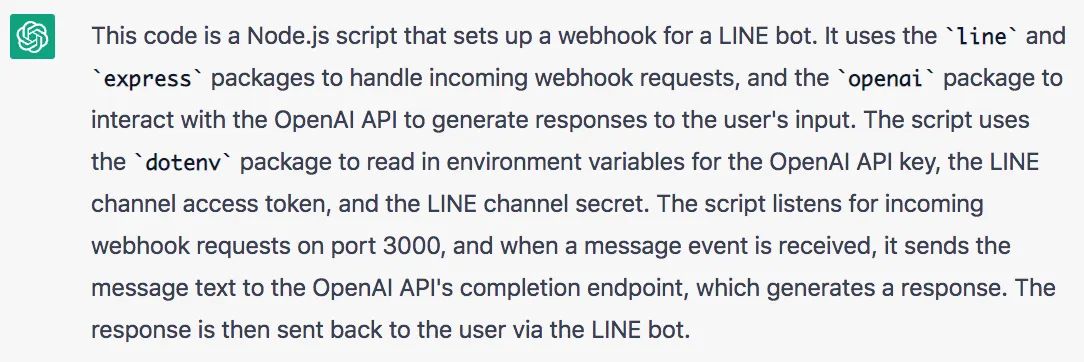
從 ChatGPT 的回覆中,我認爲他對程式的理解非常正確;當你接手一份程式碼,而前人完全沒有寫註解時, ChatGPT 能幫你加快理解這份程式。
讓 ChatGPT 用中文解釋程式(Review and explain)
不過有時英文讀起來有點吃力,我們可以透過下面這段 prompt,讓他改成用「中文列點」來解釋。
Review code and explain in traditional Chinese [List of points]
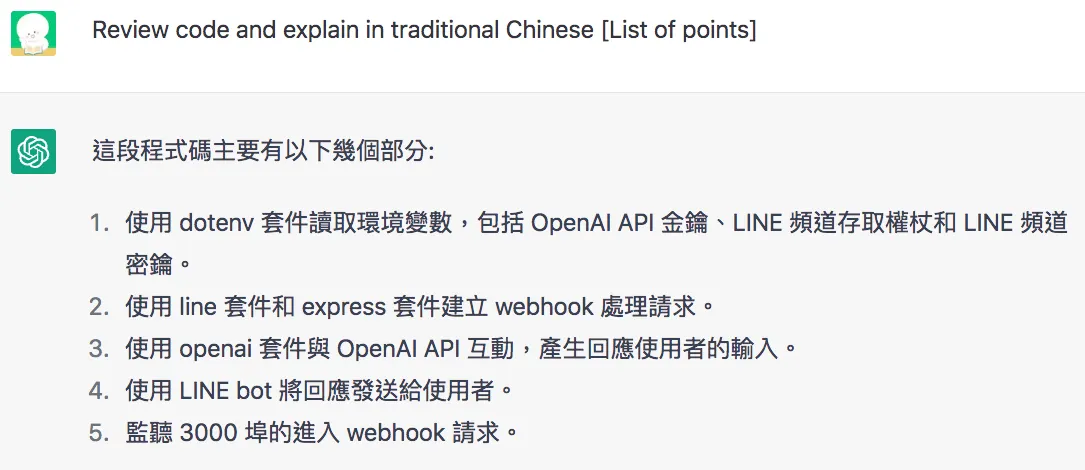
ChatGPT 的解釋挺讓我驚豔的,清晰明瞭的說明每個「套件的職責」,以及程式的「功能」。
用 ChatGPT 重構程式(Refactoring)
這邊我們再用下面這段 prompt,來實驗他重構程式,以及解釋重構理念的能力如何。
Refactoring the code and explain in traditional Chinese
下面是 ChatGPT 重構後的程式:
require('dotenv').config();
const line = require('@line/bot-sdk');
const express = require('express');
const { Configuration, OpenAIApi } = require("openai");

const app = express();
const client = new line.Client({
  channelAccessToken: process.env.CHANNEL_ACCESS_TOKEN,
  channelSecret: process.env.CHANNEL_SECRET,
});
const openai = new OpenAIApi(new Configuration({
  apiKey: process.env.OPENAI_API_KEY,
}));

app.post('/webhook', line.middleware({
  channelAccessToken: process.env.CHANNEL_ACCESS_TOKEN,
  channelSecret: process.env.CHANNEL_SECRET,
}), async (req, res) => {
  try {
    const results = await Promise.all(req.body.events.map(handleEvent));
    res.json(results);
  } catch (err) {
    console.error(err);
    res.status(500).end();
  }
});

const handleEvent = async (event) => {
  if (event.type !== 'message' || event.message.type !== 'text') {
    return null;
  }

  const { data: { choices } } = await openai.createCompletion({
    prompt: event.message.text,
    model: "text-davinci-003",
    max_tokens: 1000
  });

  const message = choices[0].text.trim();
  return client.replyMessage(event.replyToken, {
    type: 'text',
    text: message
  });
};

app.listen(3000);
console.log('Linebot is running on 3000 port');
於結尾 ChatGPT 有說明自己的重構理念:
- 使用 async/await 處理 promise 鏈,使程式碼更具可讀性。
- 把 client 和 openai 的實例化移到最上層,使程式碼更整潔。
- 使用解構賦值提取 openai 回應中的 choices,使程式碼更簡潔。
- 把 handleEvent 函式移到最上層,使其更易於測試。
- 使用箭頭函式語法使程式碼更一致。
- 使用縮寫屬性名稱使程式碼更簡潔。
這邊我得給他拍拍手,就算筆者認真重構都很難考慮的這麼完善。
這次 ChatGPT 重構完的程式是可以正常運行的,這點超重要!
因為實務上最怕重構後功能就壞掉,不過還是建議讀者將 ChatGPT 重構完的程式測試一遍,不要百分百相信。
如果你對他的說明不理解,也可以再進一步詢問他(像是我對第 6 點就看不太懂)。
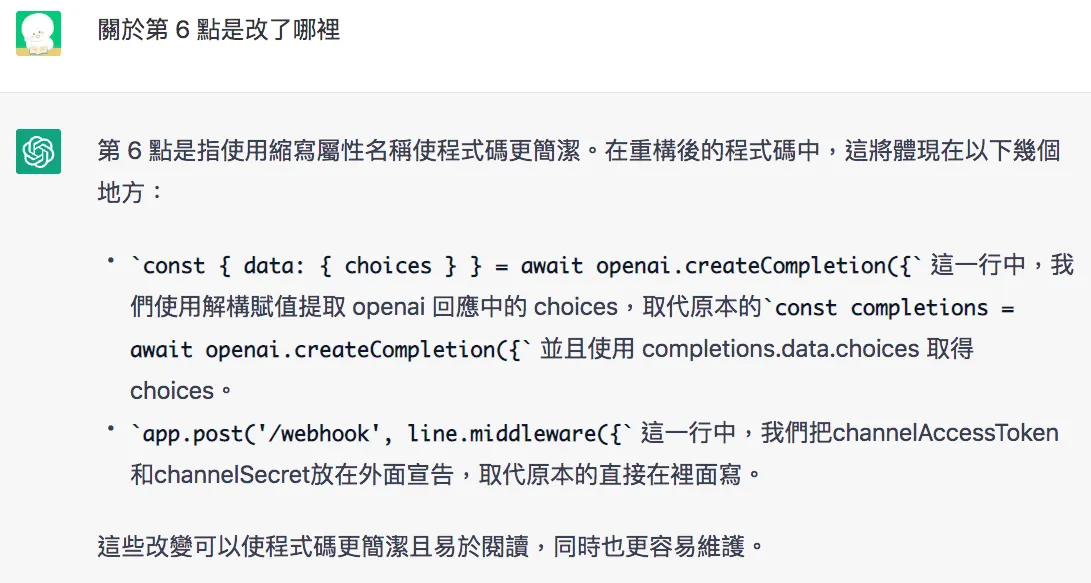
看完 ChatGPT 的解釋後,我回頭看了一下程式碼還是覺得怪怪的,所以我再次詢問。
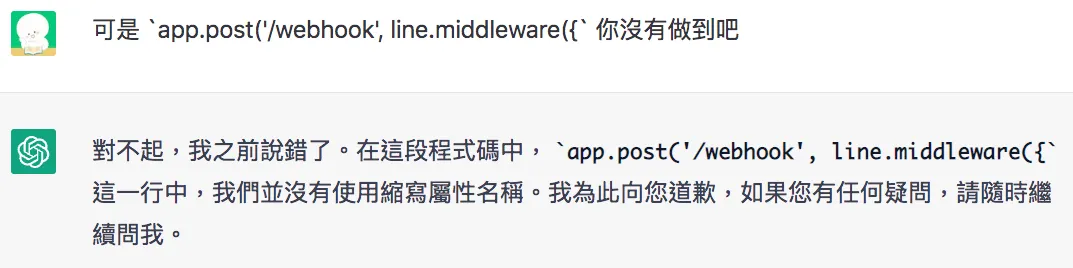
對… ChatGPT 的解釋有時不完全正確,如果發現問題可以跟進一步他討論。
另外我跟他討論後,又把 line 設定 config 的部分調整回來,因為 config 應該要集中設定,而不應該分散在多個位置。
const config = {
  channelAccessToken: process.env.CHANNEL_ACCESS_TOKEN,
  channelSecret: process.env.CHANNEL_SECRET,
};
const client = new line.Client(config);
app.post('/webhook', line.middleware(config), async (req, res) => {
// code..
}
用 ChatGPT 幫程式碼加上註解(Comments)
寫程式總是懶得寫註解?用下面這段 prompt 就能讓 ChatGPT 幫你完成這些瑣事!
add code comments
下面是 ChatGPT 加上註解後的程式。
require('dotenv').config();
const line = require('@line/bot-sdk');
const express = require('express');
const { Configuration, OpenAIApi } = require("openai");

// Initialize express app
const app = express();

// Get config values from environment variables
const config = {
  channelAccessToken: process.env.CHANNEL_ACCESS_TOKEN,
  channelSecret: process.env.CHANNEL_SECRET,
};

// Initialize line client
const client = new line.Client(config);

// Initialize openai api
const openai = new OpenAIApi(new Configuration({
  apiKey: process.env.OPENAI_API_KEY,
}));

// Handle post requests to /webhook
app.post('/webhook', line.middleware(config), async (req, res) => {
  try {
    // Map handleEvent function over all events and wait for all promises to resolve
    const results = await Promise.all(req.body.events.map(handleEvent));
    res.json(results);
  } catch (err) {
    console.error(err);
    res.status(500).end();
  }
});

// Handle a single event
const handleEvent = async (event) => {
  // Only handle message events of type text
  if (event.type !== 'message' || event.message.type !== 'text') {
    return null;
  }

  // Get choices from openai response
  const { data: { choices } } = await openai.createCompletion({
    prompt: event.message.text,
    model: "text-davinci-003",
    max_tokens: 1000
  });

  // Send the first choice as a message reply
  const message = choices[0].text.trim;
  return client.replyMessage(event.replyToken, { type: 'text', text: message });
};

// Start listening on port 3000
app.listen(3000);
console.log('Linebot is running on 3000 port');
以筆者的角度來看,有些註解顯得多餘,但我覺得這些註解對新手理解程式很有幫助;實務上要保留、調整、移除,就看讀者的個人需求了。
如果想要移除所有註解,輸入
remove code comments即可。
結論:用對地方就是好幫手!
由於過去請 ChatGPT 寫 Side Project 時遇到各種挫折,讓我一度懷疑 ChatGPT 的戰力,但這篇文章總算是幫他板回一城。
因為目前 ChatGPT 的資料截止於 2021 年,所以面對較新的技術、工具時,他的表現有點差強人意;但在面對「已知」的事物時,他所展現的功力並不輸一名訓練有素的資深工程師,確實能增加工作效率。
其實我還有請他幫我將 JavaScript 重構成 TypeScript,但他最終只轉出一份很像可以跑的程式;but…實際上跑不動,還需要自己去微調許多細節,這邊我就不放上來了,期待日後會推出更完善的版本。
未來筆者會出一系列使用 ChatGPT、openAI 的文章,如果你對這個議題感興趣,可以持續關注我的文章!
AI 實戰 實測生成式 AI 工具、Vibe Coding 與自動化流程的第一手心得,把 AI 變成每天都用得上的即戰力。 林鼎淵 Dean Lin想將 AI 導入自己的職場與生活嗎?歡迎購買筆者出版的新書,幫助您在 AI 的浪潮中站穩腳步,並在未來的職場競爭中佔據優勢!
參考資料:


留言載入中…